A/B testing agents
An agent change can pass evals and still behave differently with real conversations. An experiment sends some new conversations to a candidate and keeps the rest on the published control. It pins both exact versions, measures them with the same rules, and leaves the publication decision to you.
Nothing is published automatically.
Before you start
You need:
- A published agent. Its published version becomes the control.
- A candidate branch with the change you want to test. You can create one in the setup wizard.
- Editor or administrator access to the application.
- Optionally, a boolean or number Conversation Insight as the primary metric. You can run a guardrails-only experiment without one.
Agent Experiments are enabled by default. If the Experiments tab or API is unavailable, an application or company setting may have explicitly disabled agentBranchingEnabled. An application setting takes precedence over the company setting, which takes precedence over the platform default. AGENT_BRANCHING_ENABLED=false changes only that platform default. An explicit application or company setting still takes precedence.
Code Execution and Skills use the same default-on and scoped-override pattern. Code-execution output retrieval and generated-file indexing are separate capabilities and remain off unless configured.
Set up an experiment
Open the agent's Experiments tab and choose Start experiment. The wizard has four main steps: Candidate, Guardrails, Metric, and Review. A conditional Insight nodes step appears after Metric when a node-sourced metric needs an arm-by-arm mapping.
1. Choose the candidate and limits
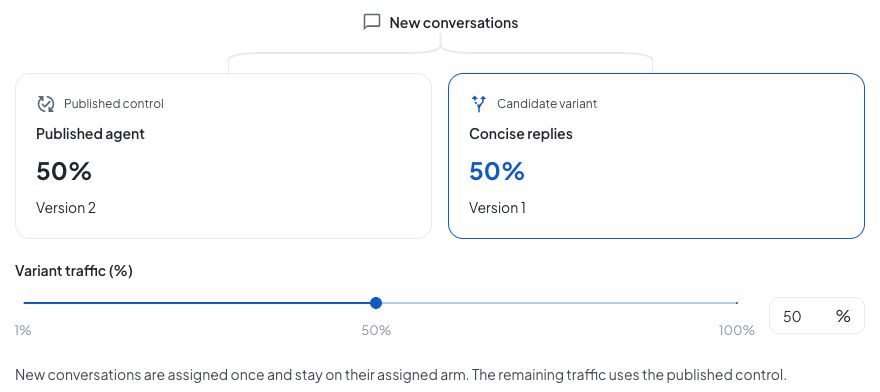
Name the experiment, choose the candidate branch, and set the share of new conversations it receives. Each conversation is assigned once and stays on that arm. Conversations that started before the experiment remain outside it.
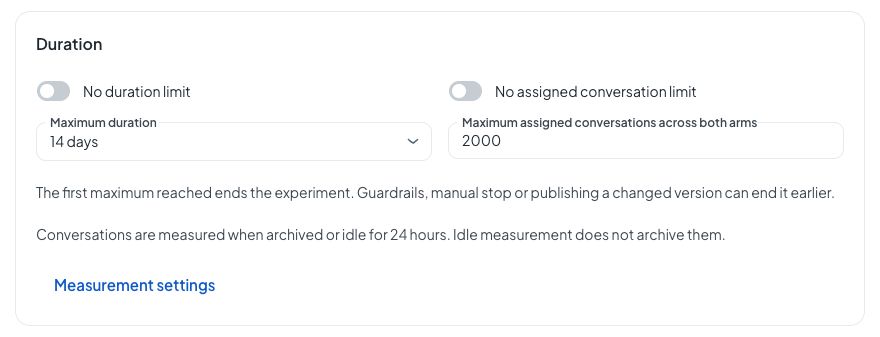
The same step holds the stop limits. You can cap elapsed time, total assigned conversations, or both. The first limit reached ends the experiment. Measurement settings opens the idle window, which decides when an unarchived conversation is ready to measure.
2. Set guardrails
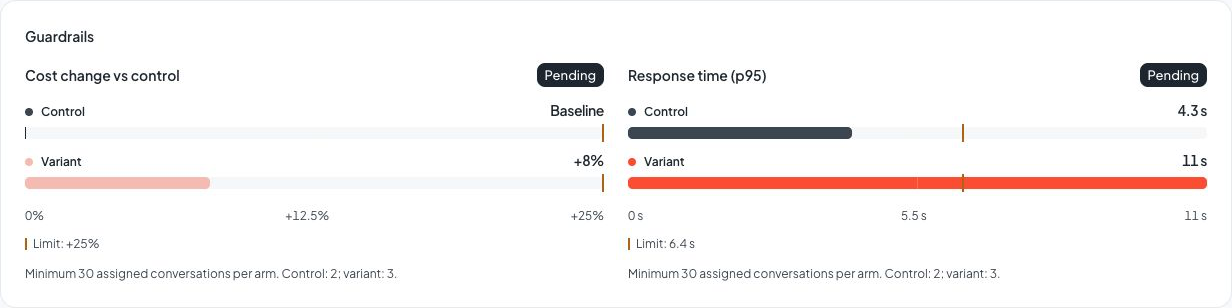
Guardrails stop the experiment when the candidate regresses beyond a limit. Each guardrail also has a minimum assigned-conversation count per arm. Until both arms reach that floor, it stays Pending.
Use the slider for a quick limit and the percentage field for an exact value. Choose Check timing to set that guardrail's assigned-conversation floor.
| Guardrail | Comparison | Default limit |
|---|---|---|
| Cost per conversation | Relative change from the control baseline | Candidate may increase by 25% |
| Response time (p95) | 95th-percentile response time per turn | Candidate may increase by 50% |
| Errors | Share of executions with an error or terminal failure | Candidate may increase by 25% |
| Unanswered conversations | Share ending with an unanswered user message | Candidate may increase by 25% |
The customer-facing cost comparison uses signed percentages: the control is Baseline, the candidate is shown as a change such as +8%, and the configured limit as +25%. If the control baseline is zero or unavailable, Docana shows the comparison as unavailable instead of inventing a ratio. Guardrail status still comes from the configured limit, independently of whether the candidate is currently better or worse than control.
3. Choose what to measure
Choose a boolean or number Insight and whether higher or lower values are better. Text Insights cannot be a primary metric. Choose Guardrails only when you want safety monitoring without a recommendation. This step also sets the minimum elapsed time and measured conversations per arm required before Docana makes a recommendation.
For a deterministic workflow event, use nodeReached with a boolean Insight or nodeExecutionCount with a number Insight. The control and candidate can have different node IDs for the same event, so confirm the meaning in each reviewed version. The wizard shows the workflow path and adjacent nodes to help you compare them.
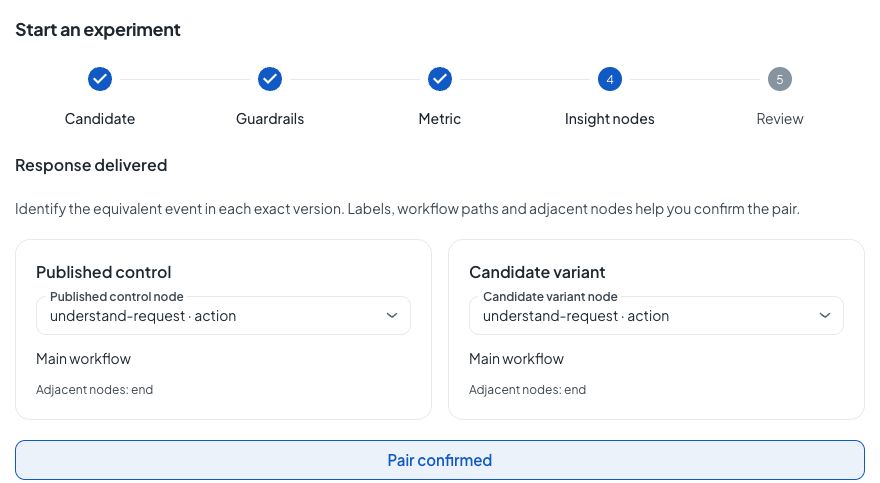
If an arm has no equivalent node, mark it unavailable. An unavailable mapping never becomes false or zero. Choose another metric or continue with guardrails only; Docana records the exclusion with the experiment.
The setup response includes a definition fingerprint. Docana checks that fingerprint and the two reviewed artifact versions when the experiment starts. This prevents a changed candidate, edited Insight, or different node mapping from slipping into the comparison after review.
4. Review and start
Review the control and candidate names, artifact IDs, versions, traffic allocation, metric direction, node mappings, guardrails, evidence minimums, and stop limits. Starting sends real traffic.
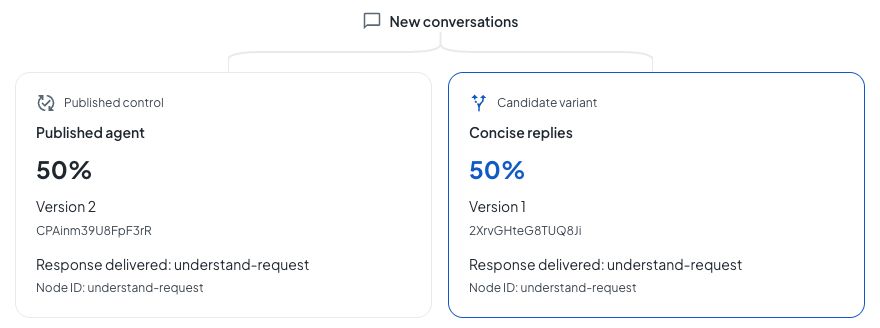
Editing the candidate after start does not change the pinned variant. Publishing a changed agent version ends the running comparison because the published control moved. Only one experiment can run per agent.
Read the result
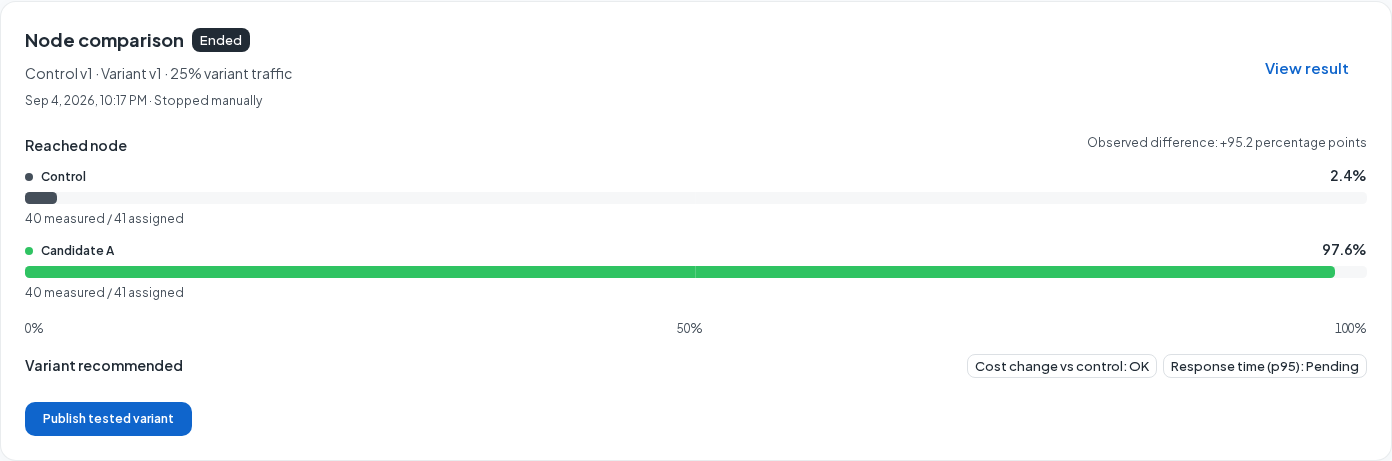
The Experiments list is a compact overview. It shows the latest arm values and observed difference, the recommendation, progress toward time and assigned-conversation stop limits, guardrail status, and lifecycle actions. Its progress bars describe stop conditions, not statistical readiness. Pausing enrollment does not pause elapsed time.
Open View result for the evidence detail. The main comparison keeps the published control and candidate visible as two named arm cards with their pinned versions, tested allocation, metric estimate, measured and assigned counts, and metric sample count. Currently ahead describes only the observed estimate in the chosen direction. It does not mean Docana has enough evidence to recommend that arm.
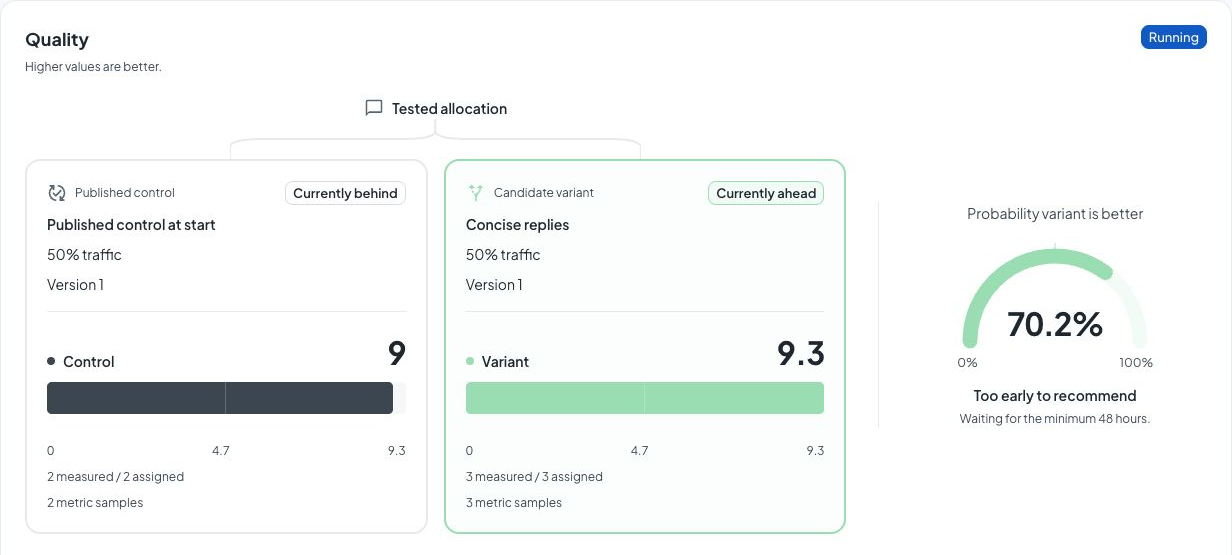
Read the numbers separately:
- Assigned counts conversations routed to an arm that did not later become mixed.
- Measured counts assigned conversations whose latest eligible snapshot contains a parseable value for the primary metric.
- Metric samples are the observations used for the displayed estimate. Guardrails keep their own per-arm sample counts and readiness floors.
- Probability variant is better uses the selected higher-or-lower direction. The recommendation remains Too early, Inconclusive, Variant recommended, or Control recommended according to the minimum evidence and probability rules.
Measured counts can lag assigned counts while conversations remain open. A pruned history, excluded mapping, missing snapshot, or unavailable value is omitted from the estimate rather than counted as zero.
The detail page keeps probability and recommendation separate from the observed lead. It also shows expected loss, units, frozen measurement definitions, closure timing, and exact artifact pins. Numeric values use the current locale, so 9.3333 is shown as 9.3 in English and 9,3 in Portuguese. Counts use locale grouping.
Guardrails compare each arm with the configured limit. A red candidate indicator means the observed cost or response time is worse than control. It does not by itself mean the guardrail breached. Pending, OK, and Breached remain the authoritative states.
Pause, resume, stop, or publish
These actions have different consequences:
- Pause enrollment sends new conversations to the published main. Existing experiment assignments keep their pinned versions and continue to be measured. Time limits and guardrail sweeps continue.
- Resume enrollment admits conversations created from that point onward. Conversations created during the pause remain outside the experiment.
- Stop experiment is final. New traffic returns to the published version, open experiment conversations become mixed and are excluded, and the result stays in history.
- Publish tested variant is an explicit decision. It publishes the exact reviewed candidate as live main and ends the experiment. The action remains available for running or ended experiments even when the result is early, inconclusive, control-favored, or has a breached guardrail, so review the evidence before confirming.
Publishing requires all four reviewed pins: control artifact ID and version, plus candidate artifact ID and version. If any pin is stale, or another experiment is running when you try to publish a historical result, the server returns a conflict and asks you to review again. It never treats a moving branch head as consent.
Ordinary branch promotion is different. It moves the candidate to the main draft and does not publish it. A running experiment's traffic, metric, node mappings, guardrails, evidence minimums, and limits are immutable. Stop it and start a new experiment to change them.
Experiment history is retained. There is no experiment deletion operation.
API, MCP, and CLI
The REST API, MCP server, and CLI cover the complete setup and lifecycle. The MCP tool names below link to their API reference, including request fields, responses, and examples.
Prepare Insights and a candidate
| Task | API reference / MCP tool | CLI |
|---|---|---|
| Read the current Insights config | getAgent | docana agents insights get --agent-id <agent> |
| Replace, enable, disable, or clear Insights | updateAgentInsights | docana agents insights set / clear |
| Discover measurable workflow nodes | listAgentInsightSourceNodes | docana agents insights nodes |
| Backfill deterministic node Insights | backfillAgentInsights | docana agents insights backfill |
| Read conversation Insight aggregates | getAgentAnalyticsInsights | docana api with the documented method and path |
| Create and manage candidate versions | Branch operations and saveArtifact | docana agents branches list/create/show/discard/preview/promote; use docana api for rename or artifact editing |
Backfill accepts deterministic node points only; it does not replay AI extraction. Updating Insights replaces the complete config, so start from insights get --json and send every point you want to keep. pollAgentInsights belongs to document Insights. Use getAgentAnalyticsInsights for conversation aggregates.
Run and manage the experiment
| Task | API reference / MCP tool | CLI command |
|---|---|---|
| Review the exact setup | getAgentExperimentSetup | experiments setup |
| Start | startAgentExperiment | experiments start |
| List history | listAgentExperiments | experiments list |
| Read one result | getAgentExperiment | experiments show |
| Pause enrollment | pauseAgentExperiment | experiments pause |
| Resume enrollment | resumeAgentExperiment | experiments resume |
| Stop | endAgentExperiment | experiments stop |
| Publish the reviewed candidate | publishAgentExperimentVariant | experiments publish |
Use IDs returned by setup and list responses rather than copying IDs from a browser URL. The example below assumes response-delivered is already configured. Check it with insights get; for a node-sourced point, use insights nodes --json and insights set as described in Conversation Insights. Replace every artifact and node identifier in the example with values from your actual setup and nodes responses.
This CLI flow reviews and starts a primary-metric experiment:
export DOCANA_API_URL=https://platform.docana.com
docana whoami

docana agents branches create AGENT_ID \
  --name "Concise replies" --from published --json

docana agents experiments setup AGENT_ID \
  --branch BRANCH_ID --json > setup.json
Copy control, variant, and definitionFingerprint from setup.json into start-review.json. Add nodeMappings only for node-sourced metrics. Record unavailable mappings in excludedDataPointIds.
{
  "reviewed": {
    "control": { "artifactId": "CONTROL_ARTIFACT_ID", "version": 2 },
    "variant": { "artifactId": "VARIANT_ARTIFACT_ID", "version": 1 },
    "definitionFingerprint": "FINGERPRINT_FROM_SETUP"
  },
  "nodeMappings": [
    {
      "dataPointId": "response-delivered",
      "control": { "nodeId": "understand-request" },
      "variant": { "nodeId": "understand-request" }
    }
  ],
  "excludedDataPointIds": []
}
Then start and capture the returned experimentId:
docana agents experiments start AGENT_ID \
  --branch BRANCH_ID \
  --name "Concise replies" \
  --traffic 50 \
  --win-metric response-delivered \
  --direction higher \
  --review-file start-review.json \
  --guardrail cost:0.25:30 \
  --guardrail latency:0.5:30 \
  --min-hours 48 \
  --min-measured 30 \
  --max-hours 336 \
  --max-threads 2000 \
  --idle-hours 24 \
  --json

docana agents experiments list AGENT_ID --json
docana agents experiments show AGENT_ID EXPERIMENT_ID --json
docana agents experiments pause AGENT_ID EXPERIMENT_ID
docana agents experiments resume AGENT_ID EXPERIMENT_ID
For a guardrails-only run, omit --win-metric, --direction, --min-hours, and --min-measured.
To publish, read the experiment again and copy its exact controlArtifactId, controlVersion, variantArtifactId, and variantVersion into a separate review file:
{
  "expectedControlArtifactId": "CONTROL_ARTIFACT_ID",
  "expectedControlVersion": 2,
  "expectedVariantArtifactId": "VARIANT_ARTIFACT_ID",
  "expectedVariantVersion": 1
}
docana agents experiments publish AGENT_ID EXPERIMENT_ID \
  --review-file publish-review.json --json
REST callers send the same file to the versioned route:
docana api POST \
  /api/v1/agents/AGENT_ID/experiments/EXPERIMENT_ID/publish/ \
  -d @publish-review.json
An MCP client calls publishAgentExperimentVariant with the same reviewed values nested under body:
{
  "agentId": "AGENT_ID",
  "experimentId": "EXPERIMENT_ID",
  "body": {
    "expectedControlArtifactId": "CONTROL_ARTIFACT_ID",
    "expectedControlVersion": 2,
    "expectedVariantArtifactId": "VARIANT_ARTIFACT_ID",
    "expectedVariantVersion": 1
  }
}
The server rejects stale pins with 409; fetch and review the result again instead of substituting the latest branch version.
When a dedicated CLI command does not cover an operation, use the authenticated API escape hatch with an HTTP path, not an operation ID:
docana api PATCH \
  /api/v1/agents/AGENT_ID/branches/BRANCH_ID/ \
  -d '{"name":"Concise support replies"}'

docana api GET \
  /api/v1/agents/AGENT_ID/analytics/insights/ \
  applicationId=APPLICATION_ID
Run docana api schema search agent experiments or docana api schema search conversation insights against your deployment to inspect current parameters and responses.
Next steps
- Conversation Insights: define the data points an experiment can measure
- Testing Agents: catch regressions with evals before using live traffic
From the employee profile
For an employee, open Performance to see the current experiment, its tested versions, assigned conversations, and latest recommendation. The card links to the full result and distinguishes paused enrollment from paused measurement. After the test ends, it links to the recorded result. Without an experiment, it offers Set up an experiment.
The comparison uses only conversations assigned to that experiment. Publishing the tested version remains an explicit decision on the result page.