Tables
Turn documents and conversations into records you can review, export, and query. Choose your columns, then extract values from documents or let an agent save them. Open Tables to start.
A contract register tracks vendors, renewal dates, and amounts. An expense register can also show who submitted each record and its receipt. The screenshots use demonstration data; open any image to see it at full size.
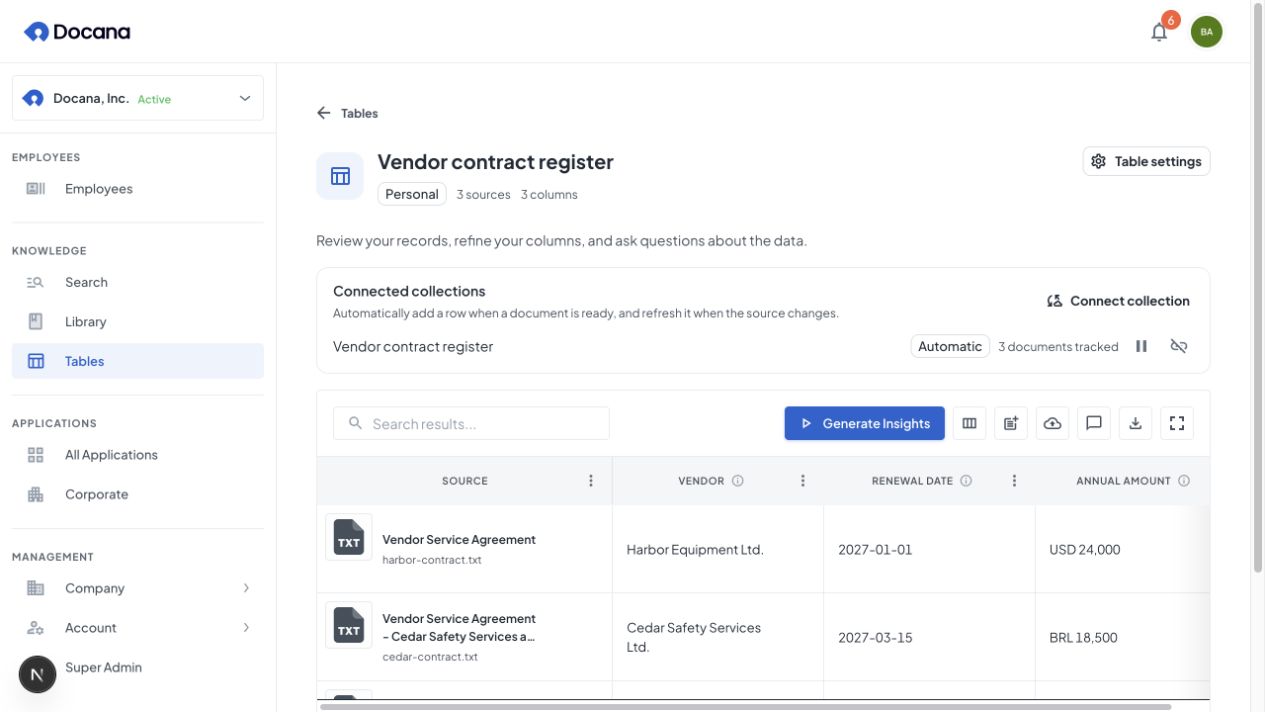
Give your employees facts they can return to
An employee can collect an expense, another can help review it, and a reporting workflow can query the published totals. Managed tables let authorized employees and integrations return to the same records across jobs.
Collections and connectors bring in documents; tables hold their comparable facts. Agent workflows combine those facts with document knowledge, such as policies and terms. After testing and publishing, people can use the employee through a website widget, WhatsApp, or your own application.
A shopping assistant, for example, can query matching products and explain them using product guides. Follow the catalog-to-assistant example for the current CSV route, from preparation to a customer-facing channel.
Conversation Insights can also collect one row per conversation for support reporting.
Classification columns add categories, yes/no decisions, or scores from saved fields. Preview the results, give categories colors, and reclassify when a decision rule changes without repeating extraction.
Conversation memory supplies summaries of earlier interactions. Tables store explicit records a configured workflow can look up. Saving a record does not copy the whole conversation or grant other agents access.
Choose how information enters the table
Documents and directly saved records can share a table. The way you add a row determines how its values are filled.
| Start with | How rows are created | How columns are filled | Good for |
|---|---|---|---|
| Selected documents | Each selected document becomes a row | AI reads the document using each column's instructions | A batch of contracts or invoices |
| A connected collection | Ready documents become individual rows, including later arrivals and changes | Extraction runs in the background | Ongoing invoice or supplier-document intake |
| An agent conversation | A save step creates a record when the workflow reaches it | The agent supplies confirmed values and optional supporting documents | Reimbursements or case intake |
| Conversation Insights | One row per conversation, updated when insights change | Saved extracted fields and workflow measurements fill its columns | Support trends, sentiment, and follow-up reports |
| An integration | An API, CLI, or MCP call saves one record | Supplied JSON values are saved directly | Forms or systems that already have structured fields |
Column instructions guide document extraction. Directly supplied values are saved as provided, without running those extraction prompts again. An agent can still use AI earlier in its workflow to understand a conversation or receipt.
An uploaded CSV follows a separate dataset flow. You can preview and query that file, but uploading it does not populate a table in this directory. Large bulk imports and database connections into managed Tables are still in development.
Create your first document table
Start with a few representative documents so you can check the column instructions before adding the full collection.
1. Choose its home and name
For your own work, open Tables and choose New table. Give it a specific name, such as “Vendor contract register,” and shared instructions, such as “Keep amounts in the original currency and leave missing facts blank.”
For an employee or application, create the table from that application's Tables page, or ask the employee preparation assistant to create it. That places the table in the application's scope so its authorized agents can use it. Creating a table from the central page makes a personal table.
2. Define the facts to collect
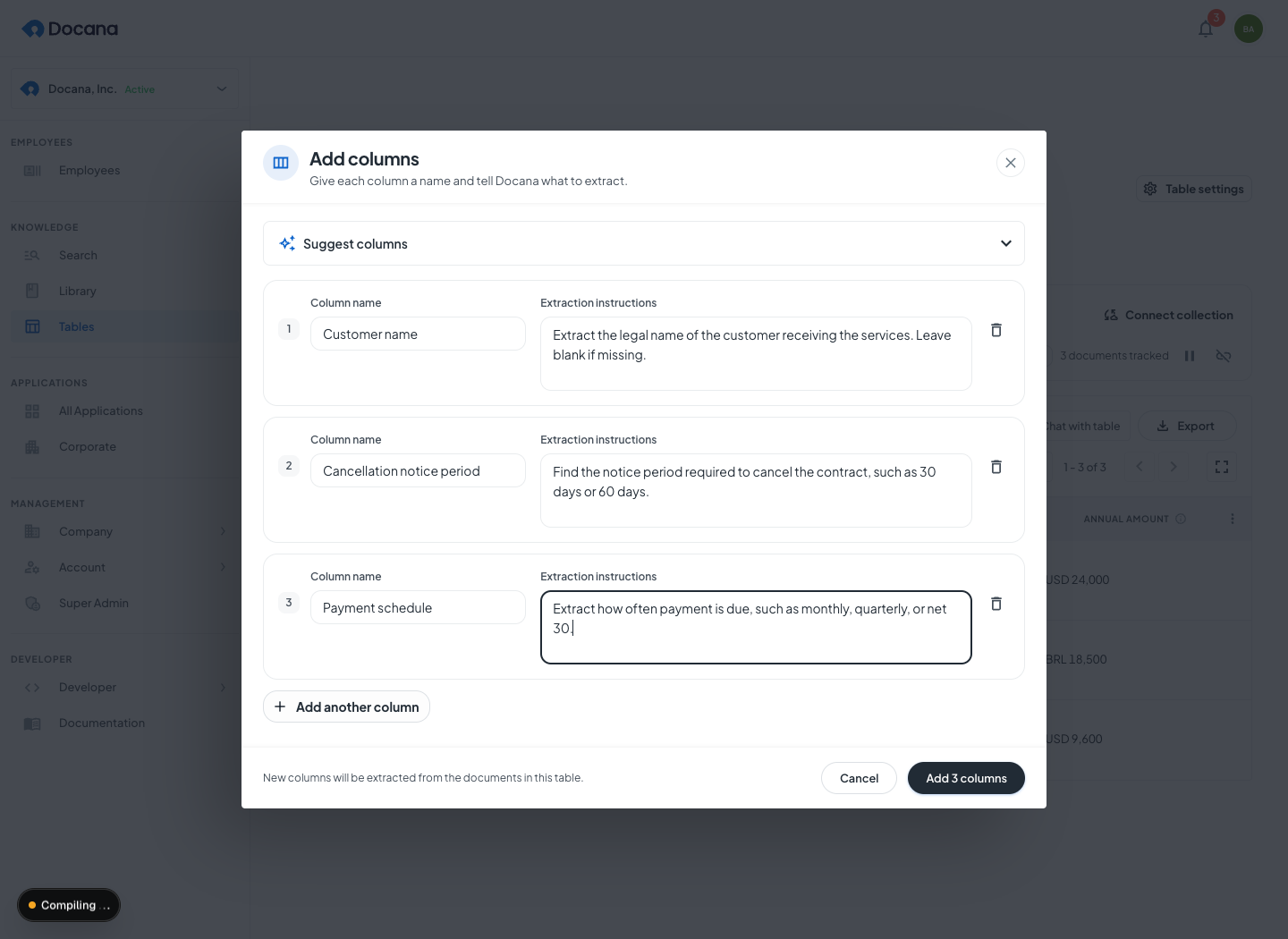
Choose Add Column. Give each column a name and extraction instructions. For multiple columns, edit each name and instruction separately. Suggest columns can propose a structure from a description of what you want to track. Review the proposal before adding it.
| Column | Example instructions |
|---|---|
| Vendor | Extract the supplier's legal name. Leave blank if it is not stated. |
| Renewal date | Extract the next renewal date in YYYY-MM-DD format. Do not invent a date. |
| Annual amount | Extract the annual amount with its original currency. |
| Notice period | Extract the notice required to cancel, such as 30 days. |
3. Add documents or connect a collection
Choose Add Documents to select existing files, or Upload documents to add new ones. New document sources start processing in the background. A 50-contract table with 4 extraction columns produces up to 200 extracted values to review.
Use Connect collection when you want one row for each ready document and automatic processing of later arrivals. A collection selected as an analysis source inside Add Documents produces a collection-level analysis row. It does not create an automatic connection. See keeping a table updated.
4. Review the results
Check the values against the source documents. Missing facts can remain blank, and queued or failed cells do not count as completed answers. Refine a column when its instruction is ambiguous. Adding or updating extraction columns can process document values and consume AI usage.
Use Generate Insights to run document extraction again when needed. Directly saved agent or integration values remain intact when document extraction reruns. Renaming a column also preserves its stable ID for integrations.
Find a table and understand its access
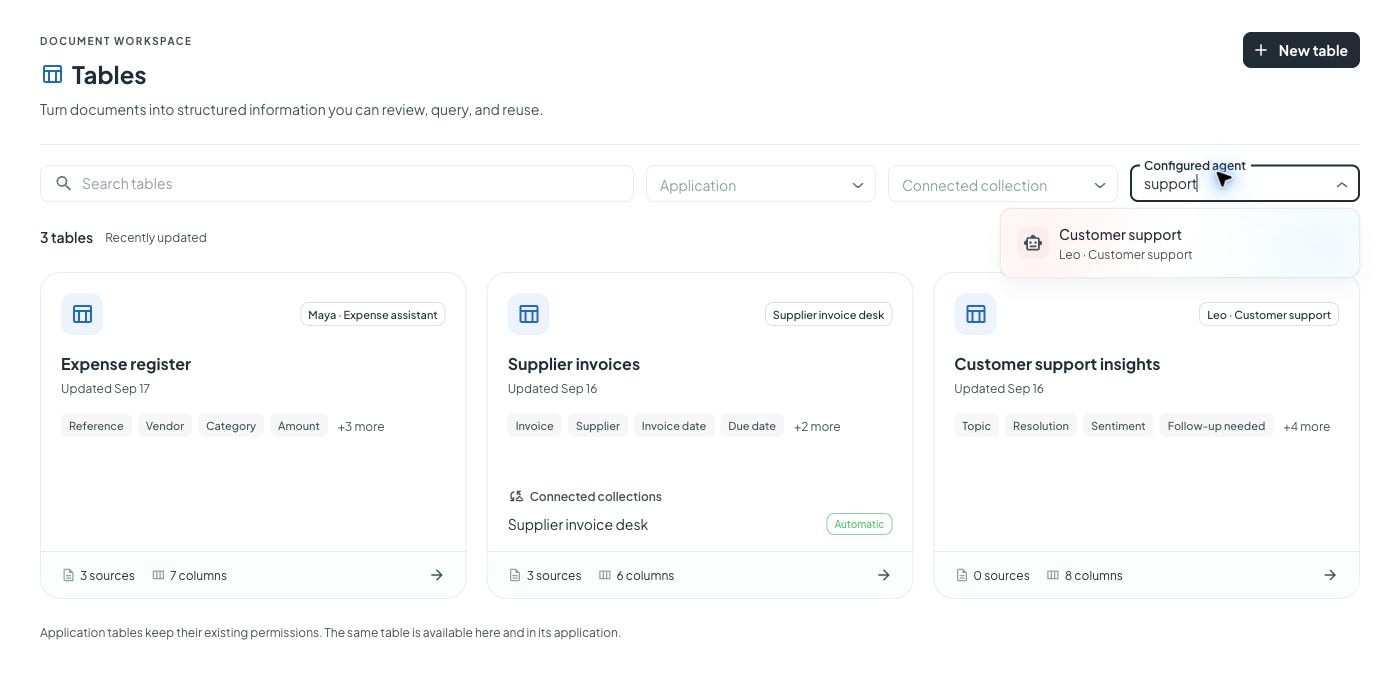
The central directory brings your accessible personal and application tables together. Search by name or combine application, connected-collection, and configured-agent filters. The selection stays in the URL across reloads and pagination.
| Table scope | Where it appears | Who can use it |
|---|---|---|
| Personal | Your central Tables list | Its creator, under the existing access rules |
| Application | The application's Tables page and the central list | Authorized application users and agents |
Agent runs acting as guests cannot discover, describe, or query managed tables through the dataset tool, even with application membership or explicit table IDs. This includes channel visitors such as WhatsApp and website widget users. Connecting a table to an application does not make it available to those guest runs. Authorized uploaded CSV datasets keep their separate document access rules.
Already using a Document Insights application (also called a Document Site)? Its tables appear here too, with the same IDs and access. You do not need to move or copy them.
Connected collections appear on cards even when no rows have arrived. The collection filter includes paused connections. The configured-agent filter shows the agent's Conversation Insights table, including a paused connection, and explicit table selections in its current draft or published workflow. It cannot infer tables an agent chooses dynamically or reaches through a sub-agent.
Table access does not grant access to a private source conversation or document. The person, conversation, execution, and supporting evidence are shown only when the viewer can access those sources.
Keep a table updated from a collection
A collection connection is useful when documents keep arriving. Connect an existing collection, choose whether to include its current ready documents, and let background processing follow later arrivals and changes. If a Google Drive or other connector brings files into that collection, those ready documents follow the same table flow.
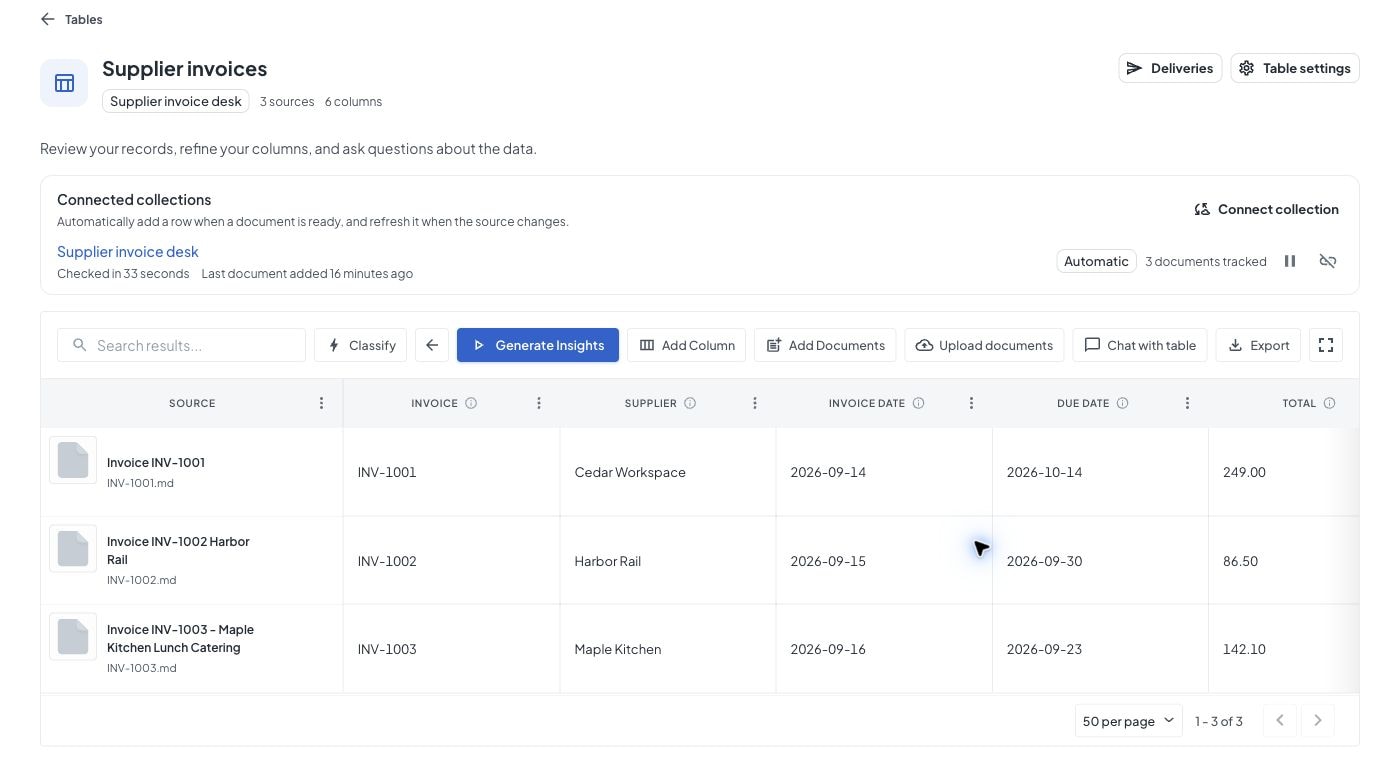
- Checked records the last successful discovery check, not completion of every extraction.
- The arrival time records a new row added through that connection. Source refreshes and retries do not count as new arrivals. Older connections show no recorded arrival until one occurs after activity tracking begins.
- Pause connection stops future automatic processing until you resume it.
- Disconnect stops the connection and keeps existing rows and source documents.
Connections created during employee or agent authoring default to paused. Review the pending-document preview and ask to start processing when ready. Direct API, CLI, and public MCP defaults are described in the headless connection guide.
Save records from an agent or integration
An agent can collect information over several messages, ask for missing facts, and save the confirmed record. In the agent editor, add a Tool call step and select Save record to table. Choose the destination and map its columns, or let the agent fill them from the available conversation context. Use a stable unique record key, such as an expense reference, so retrying the same save does not duplicate the row.
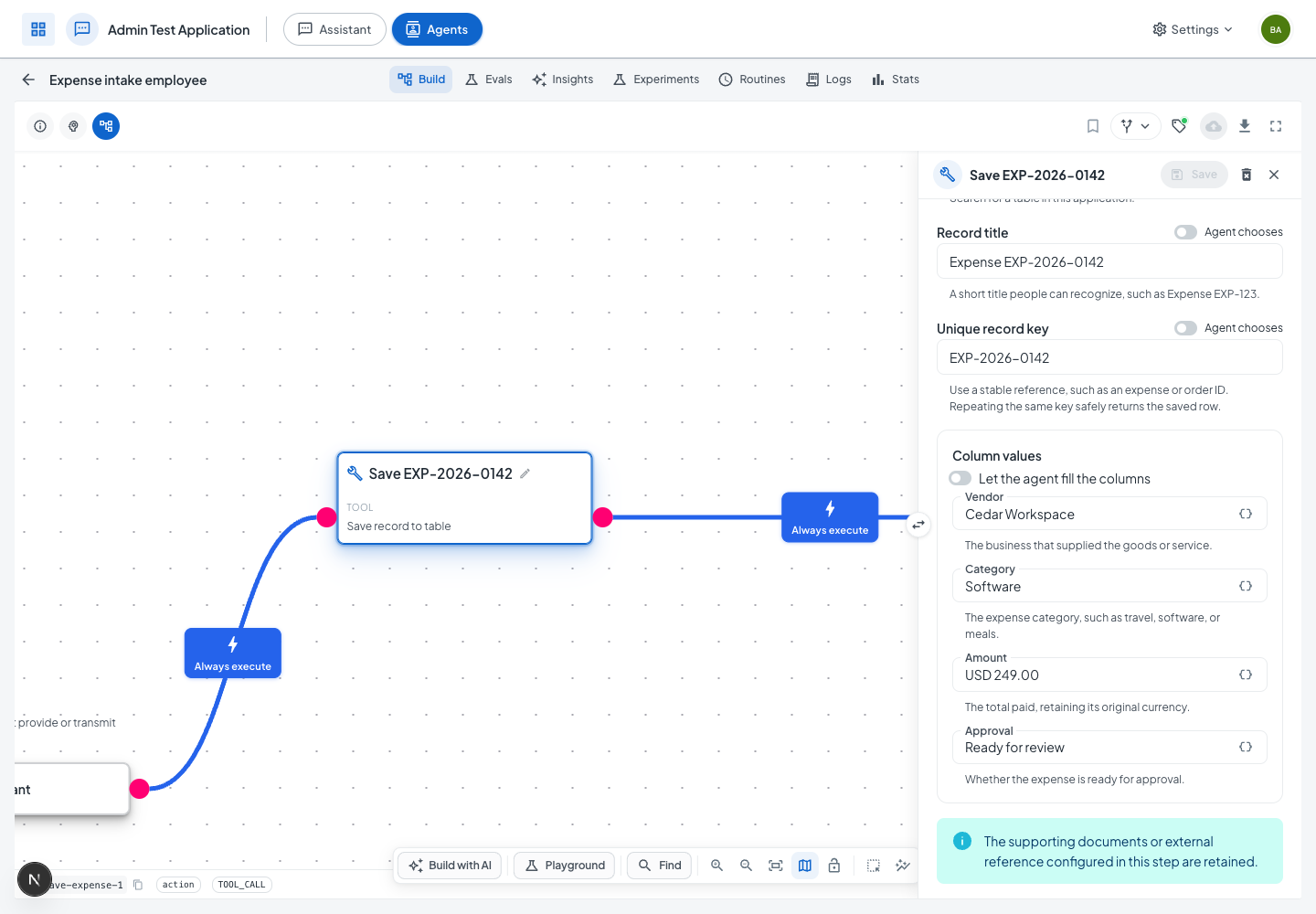
The save happens when the workflow calls the tool. Writing “save to the table” in a conversation works only when the agent has that tool and instructions for when to use it. An Instructions step can also discover a table and call the save tool dynamically.
Supporting documents must be linked explicitly. If someone submits a receipt image, save its authorized document reference with the record. The table can then show a thumbnail that opens the receipt, alongside the originating person's name and authorized Conversation and Execution links.
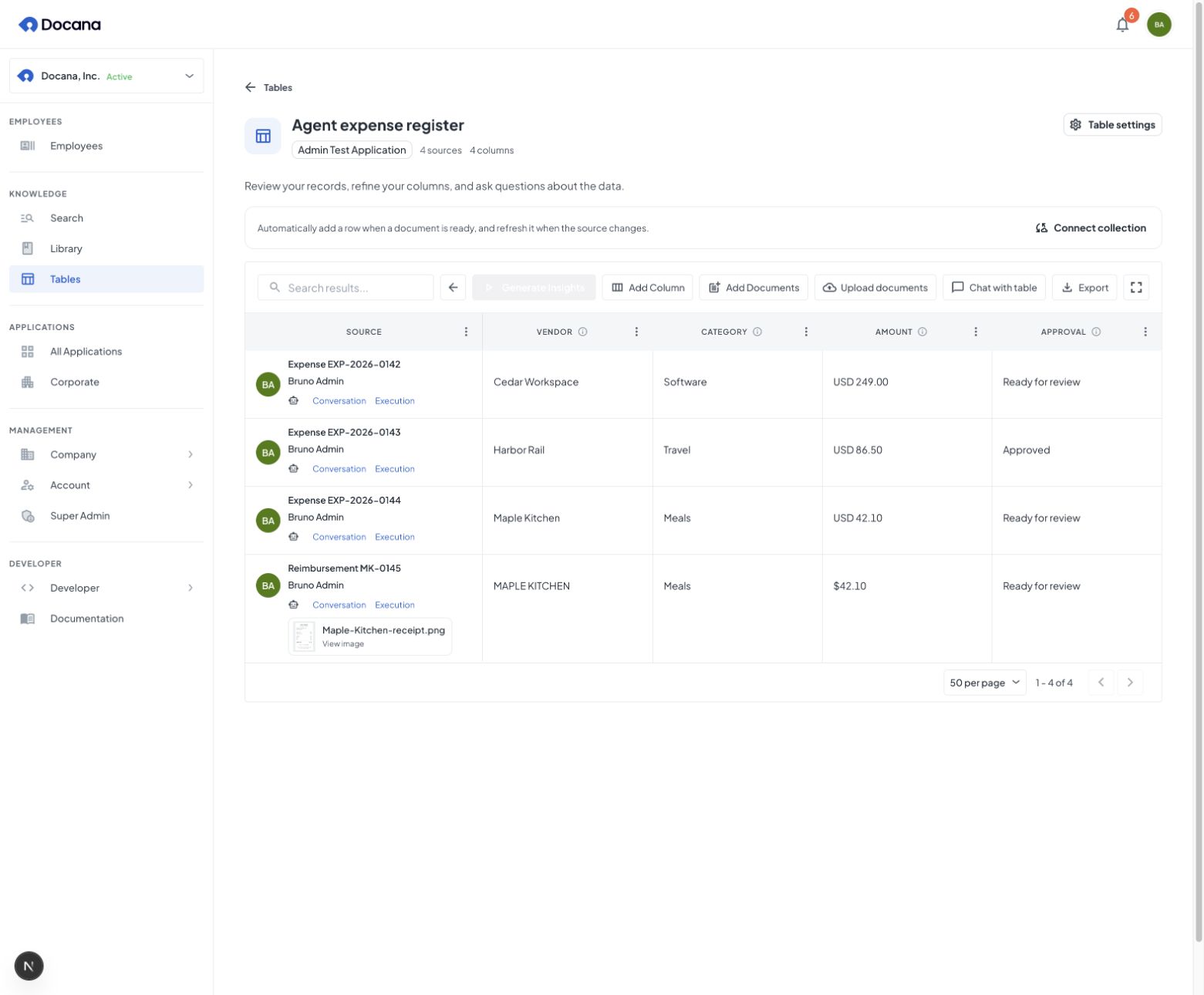
The employee preparation sidebar lists its connected Conversation Insights table, tables selected in its primary workflow, and other tables available in its application. The employee card menu opens those tables and the existing Expectations, Work history, Performance, and Knowledge panels. See the expense collector example.
For forms and external systems, use the single-record API, CLI, or MCP operation. Supplied values appear in live rows without another extraction call. External callers are recorded as API sources and cannot claim a native Docana execution identity.
Work with the results
Use the grid to review individual records, then ask table chat for totals, comparisons, and trends.
| Task | Where to do it | What it reads |
|---|---|---|
| Find or compare individual rows | Grid search, sort, and pagination | Current visible rows |
| Read records in an integration | JSON row API, CLI, or MCP | Current visible rows and processing status |
| Save a file for a spreadsheet | Export → Download CSV | Current page for managed records, or the latest published CSV for document extraction |
| Ask for totals, comparisons, or groups | Chat with table | All authorized managed records, or the latest published document dataset |
Chat and export
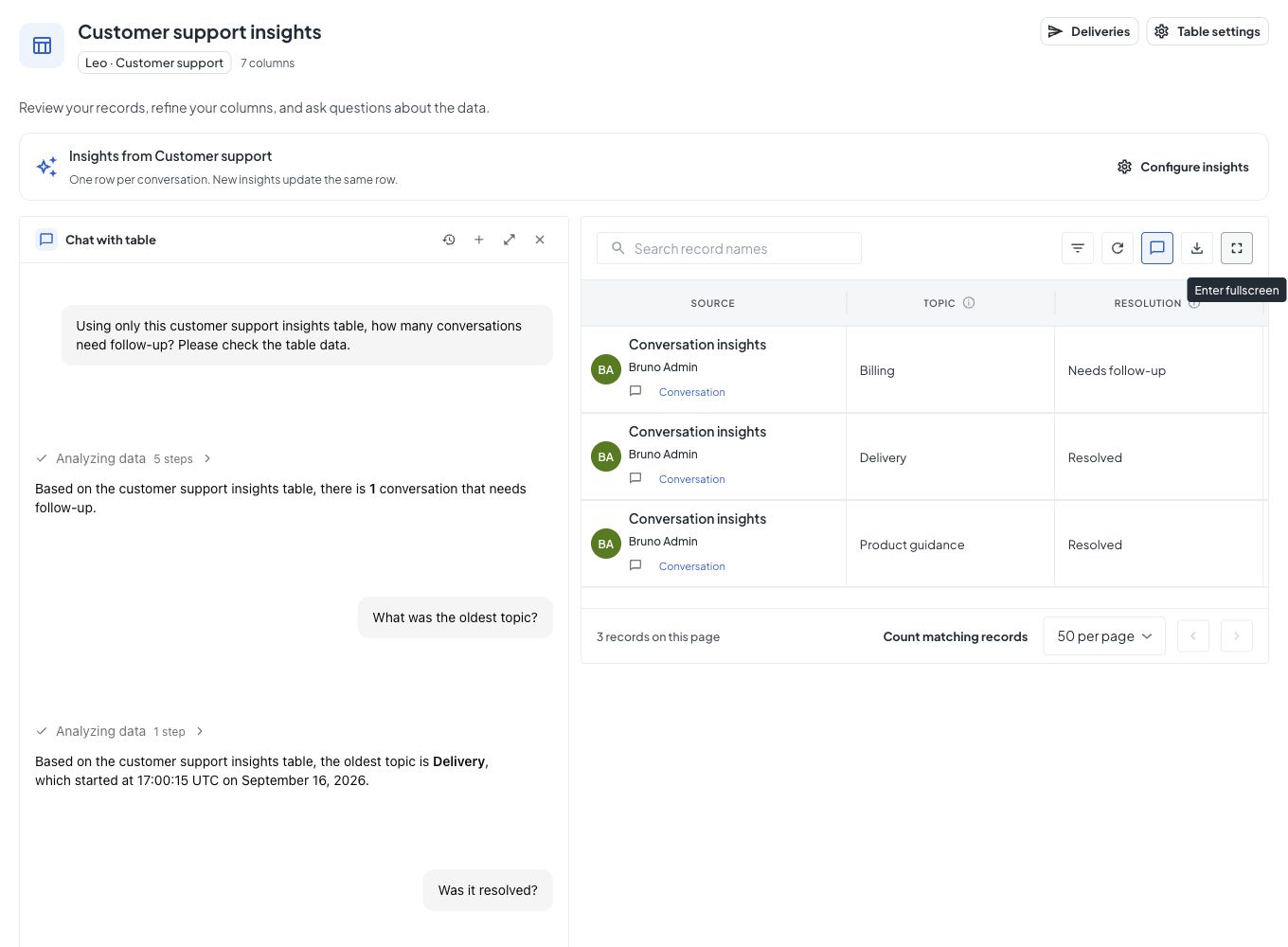
Choose Chat with table to open chat beside the records on the left. You can expand chat, restore the split view, or close it while keeping your place in the table. Document and conversation insight tables use the same layout and toolbar, with only the actions that apply to their source.
Ask a specific question, such as “Group annual contract amounts by currency.” Chat can query beyond the visible page. Include any filters you want in your question. Keep currencies separate unless you supply a conversion rule.
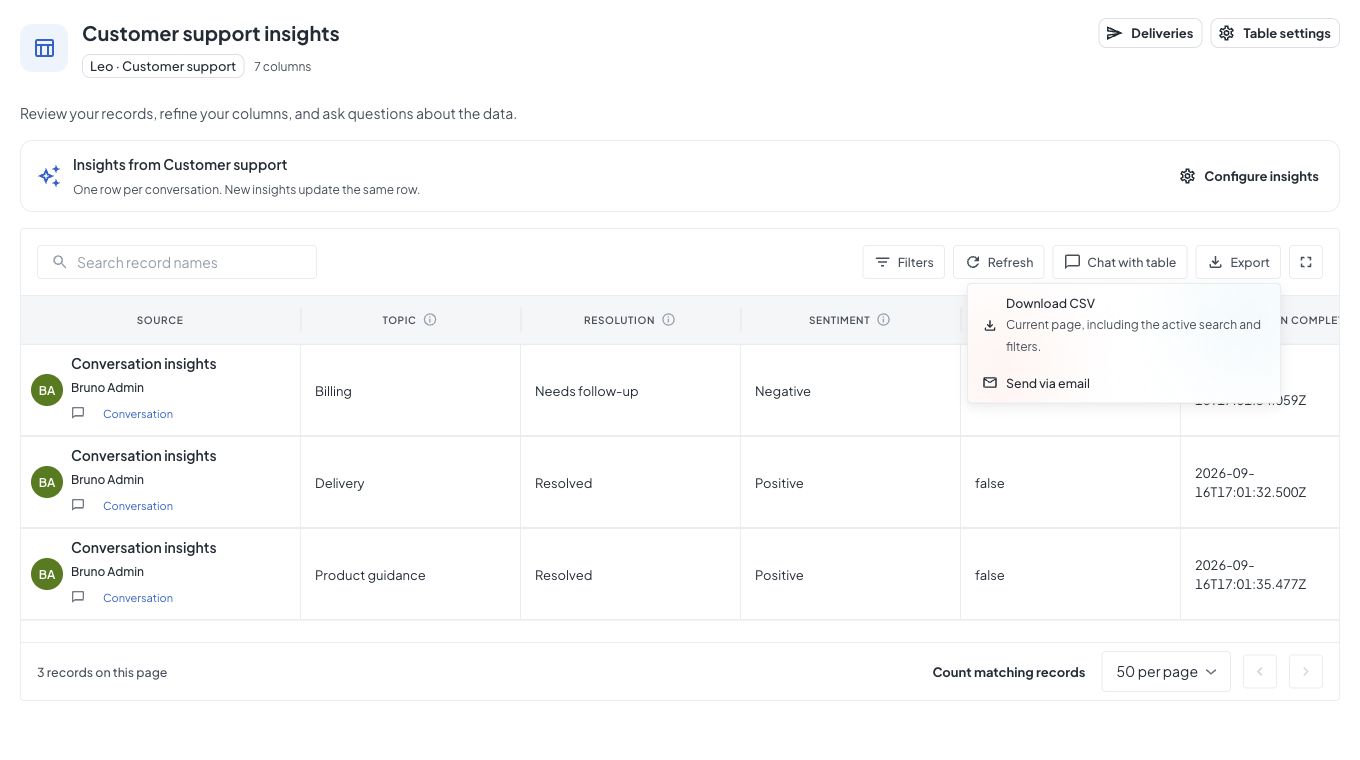
All tables share the Export menu. Its download option shows the scope of the CSV. Choose Send via email to open Deliveries, where you can select records, recipients, and a report schedule. For conversation insight tables, Configure insights opens the agent's table workspace. Use Add Column or a column menu there to change what it extracts. Insights settings keeps generation timing, sampling, and summary controls. Document upload and extraction controls appear only where they apply.
Live rows may be newer than chat or export while publication is pending. Wait for publication when an answer must include the latest arrival. Expand chat gives a wide answer more space, and Show table and chat restores the grid without losing the conversation.
Read records as JSON
Read live rows, column definitions, source details, and processing status under the caller's permissions. The JSON examples cover paging, search, sorting, and incomplete cells.
Completion email
Open Deliveries → Set up notification under Notify me when extraction finishes. Your email and a table link are filled in. Review the recipients, choose a CSV or generated report if useful, then activate and save the rule. It starts paused.
For a connected collection, the notification waits for the pending batch to drain and its publication to finish. A continuously growing backlog can delay the email. Use When new records are ready if you want updates as entries arrive.
Choose Deliveries for scheduled reports, recipient lists, filtered CSVs, and signed webhooks. For example, email this week’s expenses every Friday, or notify a system when new records are ready. See Deliver reports for the setup and headless configuration. A workflow can still use a separate Email step for a message specific to that workflow.
Next steps
Automate tables
Use the same table IDs and access rules through the API, CLI, and MCP. Automate tables shows how to connect the steps. Use the API reference for request fields and responses.
Table examples
Explore contract renewals, invoice intake, reimbursements, and a CSV product catalog. Each example connects the source information to a useful workflow.