Routines
Agents don't have to wait for someone to message them. A routine runs an agent on its own: every Monday morning, whenever new documents land in a collection, or when one of your systems calls a webhook.
Some things people build with routines:
- A daily digest of yesterday's customer conversations, emailed to the team
- An agent that processes every invoice the moment it's imported
- A weekly report generated from your latest data and sent as a document
Find routines in your application: Agents, pick an agent, then open its Routines tab.
Create a Routine
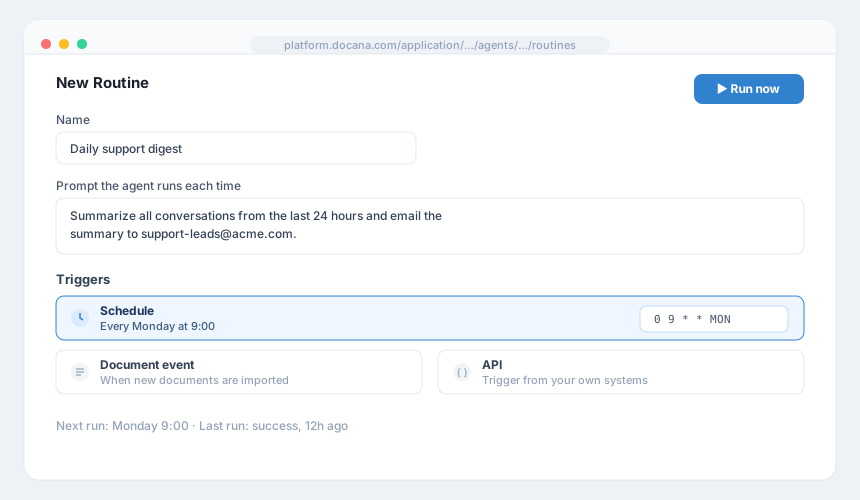
- Click New Routine
- Name it and write the prompt the agent receives on each run, like "Summarize all conversations from the last 24 hours and email the summary to support-leads"
- Add one or more triggers:
- Schedule: a cron expression.
0 9 * * MONruns every Monday at 9:00. - Document event: watch a collection. The routine runs when new documents are imported into it.
- API: Docana gives you a webhook URL and a token, so your own systems can trigger the run.
- Schedule: a cron expression.
To trigger a routine from code, create an API key with the Routine only scope (see Generating API Keys) and call:
curl -X POST "https://platform.docana.com/api/agents/${AGENT_ID}/routines/${ROUTINE_ID}/run" \
  -H "Authorization: ApiKey ${DOCANA_API_KEY}"
Manage Routines
The routines list shows each routine's triggers, next run, last run, and success rate. From there you can:
- Run now: trigger it immediately, useful while testing
- Pause / Resume: stop the triggers without deleting anything
- Edit: change the prompt or triggers
- Delete: removes the routine and its triggers. Past runs are kept.
Every run is recorded with its status, trigger, time, and duration, so you can see what happened while you weren't looking.
Best Practices
- Test with Run now first: don't wait until Monday 9:00 to find out the prompt was vague.
- Write prompts like instructions to a new hire: say what to do, with what data, and what done looks like.
- Use the Routine only API key scope: a leaked key that can only trigger one routine is a much smaller problem than a leaked full-access key.
- Watch the success rate: a routine that fails silently every night is worse than no routine.
Next Steps
- Creating an Agent - Build the agent your routine runs
- Conversation Insights - The data your scheduled reports can draw from
- API Overview - Trigger routines and more from your own systems