Document Insights
You have 50 vendor contracts and one question: which ones auto-renew next quarter? Reading all 50 takes a day. Document Insights reads them for you and puts the answer in a table.
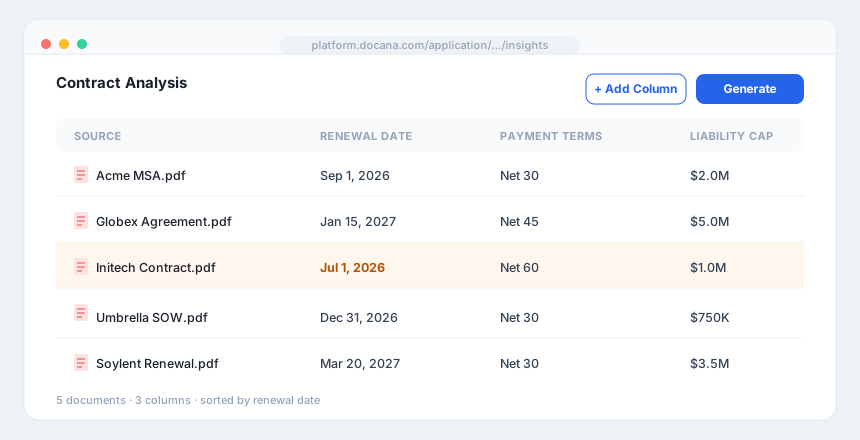
You tell Docana what to pull out of each document. It reads every document, extracts those fields, and lays the results out as a grid: one row per document, one column per field. What was 50 PDFs becomes a spreadsheet you can sort, filter, and ask questions about.
How It Works
Create an application of type Document Insights, then build the table in three steps.
1. Define your columns
A column is one thing you want from every document. Click Add Column and give it:
- Name: what to call it, like "Renewal Date" or "Payment Terms"
- Description: what to extract, written as an instruction, like "The date the contract automatically renews"
Add as many columns as you need. Each one becomes a column in the final table.
2. Add your documents
Click Add Documents and pick the files or collections to analyze. Each document becomes a row.
3. Generate
Click Generate Insights. Docana reads each document, pulls out every column you defined, and fills in the grid. A 50-contract, 4-field table is 200 values it extracts for you.
Work With the Results
Once the table is filled in, you can:
- Sort and filter by any column to find what matters, like every contract renewing this quarter
- Chat with it: open the playground and ask questions in plain English, like "which three contracts have the highest liability cap?"
- Download it as a CSV, or save it to a collection
Turn Insights Into a Database
The table you get is structured data, so it works like any other dataset. Save it to a collection and an agent can query it with SQL, the same way it queries an uploaded spreadsheet. Ask "what's the average contract value by vendor?" and the agent runs a real query against the extracted numbers.
So Document Insights closes the loop: unstructured documents go in, a queryable table comes out.
Example Uses
- Contracts: pull renewal dates, payment terms, and liability caps from every agreement, then sort by what's due soon
- Resumes: extract years of experience, key skills, and certifications across a stack of applicants
- Invoices: pull vendor, amount, and due date from each invoice into one table
- Research: extract the method, sample size, and finding from a folder of papers
Best Practices
- Write descriptions like instructions: "The total contract value in USD" extracts better than "value".
- One fact per column: separate "Renewal Date" and "Payment Terms" rather than one "Key Terms" column.
- Start small: define your columns on a handful of documents, check the results, then run the full set.
- Save it to query later: keep the output in a collection so an agent can answer number questions about it.
Next Steps
- Datasets - Query the table you just built, in plain English
- Creating an Application - Create a Document Insights application
- Enterprise Search - When you want to find documents, not extract from them