Testing Agents
An agent that talks to your customers is production software. Test it like production software. Docana lets you write test cases for an agent, run them after every change, and see exactly which step broke.
Find it in your application: Agents, pick an agent, then open its Evals tab.
Create a Test Case
- Click Create Test Case
- Write the input: the message a user would send
- Add assertions: what must be true after the agent runs. Pick a node from your workflow, the field to check, and the condition it must meet
- Optionally add initial context (data the conversation starts with) and node mocks (canned responses for webhooks and tools, so tests don't hit real services)
Run Your Tests
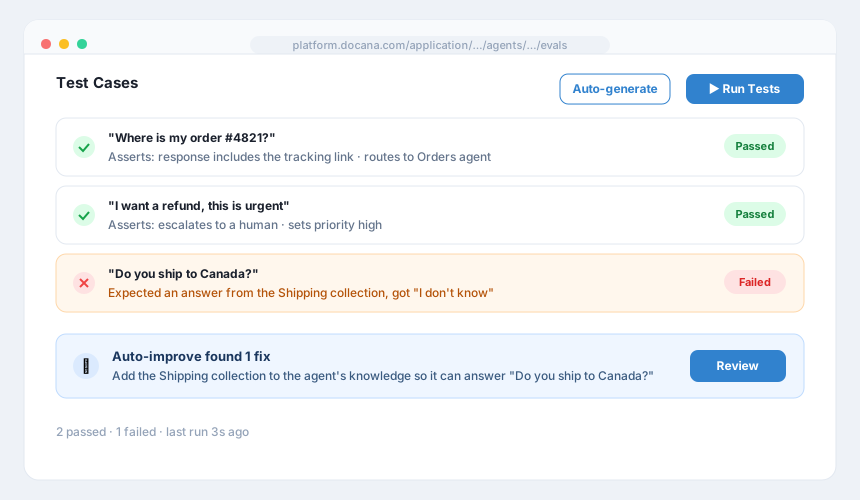
Run a single test case or all of them. Each run shows pass or fail per assertion, with the full execution result behind it: what the agent understood, which branches it took, what it answered.
Run your tests after every meaningful change to the agent, the same way you'd run a test suite after changing code.
Generate Test Cases Automatically
Writing tests is the part everyone skips. So Docana writes them for you: click Auto-generate, choose how many test cases you want, and Docana reads your agent's workflow and proposes tests that cover its branches. Review them before saving. They're suggestions, not gospel.
Let Docana Suggest Fixes
When tests fail, Auto-improve analyzes the failures and suggests changes to your agent. Review each suggestion and apply the ones that make sense. It's a code review from someone who just read all your failing tests.
Debugging a Failure
The Logs tab keeps every execution, step by step. Open a run and you can trace the exact path: which evaluation fired, what it scored, which branch the agent took, and what each node produced. Most "the agent answered wrong" mysteries resolve in the first thirty seconds of reading the trace.
Best Practices
- Test the unhappy paths: angry users, missing information, questions outside the agent's scope. The happy path was never the problem.
- Mock external calls: use node mocks for webhooks and emails so tests are fast and don't spam real systems.
- Make assertions specific: "response mentions the refund deadline" catches more bugs than "response is not empty".
- Run before you publish: a failing test case caught in the editor costs nothing. The same failure in production costs a customer.
Next Steps
- Creating an Agent - Build the agent you're testing
- Conversation Insights - Learn from real conversations after you ship
- CLI - Run agent evals from your terminal or CI