Quickstart
By the end of this page you'll have an AI assistant that answers questions from your own documents. No code required. It takes about 15 minutes.
A Docana account. If your company doesn't have one yet, request a demo.
Step 1: Give Your Documents a Home
Documents live in collections, and collections live in libraries.
- Go to platform.docana.com and sign in
- Click Knowledge Libraries in the sidebar, then New Library. Name it after the subject, like "Product Documentation"
- Open the library and create a collection, like "User Guides"
- Upload a few documents. PDFs, Word files, spreadsheets, presentations, images, even videos and audio all work
Docana starts processing right away: indexing text, reading tables, extracting images and key terms. Most documents are ready in under a minute.
Want more detail? See Creating a Library and Creating a Collection.
Step 2: Create an Application
An application is the thing your users talk to. It bundles your knowledge, your agents, and your settings in one place.
- Click Applications in the sidebar, then + Create Application
- Give it a name and pick Assistant as the type
- Select the collection you created in Step 1
- Click Create
Step 3: Talk to It
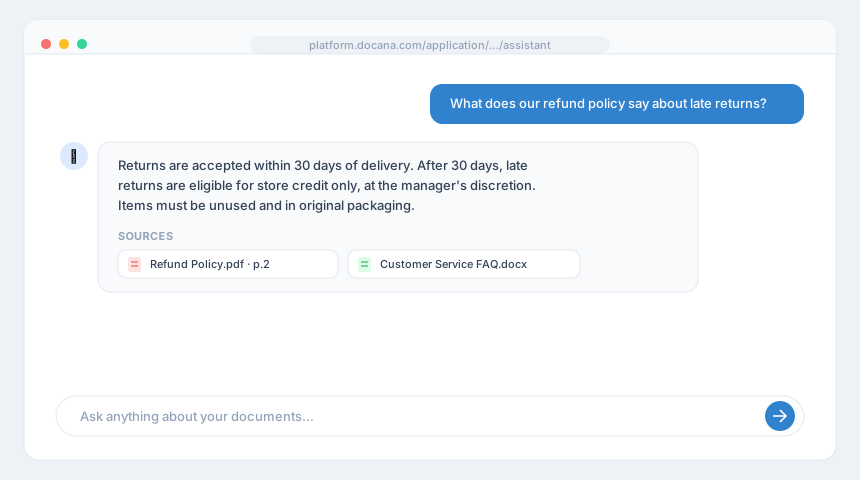
Open your application and click the Assistant tab. Ask something your documents can answer:
"What does our refund policy say about late returns?"
The assistant searches your collection, reasons over what it finds, and answers with sources cited.
If an answer looks wrong, check that the right documents are in the collection. That's almost always the fix.
Step 4: Put It Somewhere Useful
An assistant inside the platform is a demo. An assistant on your website or WhatsApp is a product.
- Web Widget: paste one script tag into your site
- WhatsApp: get a number from Docana, or connect your own
- Slack and Microsoft Teams: meet your team where it already works
Where to Go Next
- Core Concepts: the five building blocks that explain every screen in the platform
- Creating an Agent: control how your assistant decides, responds, and acts
- Creating a Template: generate documents, not just answers
- Generating API Keys: build with the API instead of the UI